This Content Type helps create a hub for communications to the public. The main Employment Opportunities hub page can be searched by name.
Adding a Employment Opportunity
Once logged in, go to the Drupal Admin toolbar and navigate to Content > Add content > Employment Opportunity
Fill in the necessary fields:
- Title: Required for the name of the item - to display on the front-end of the site.
- Closing Date
- Documents: Optional: Job Posting, Application Form, Criminal Records Check Form
- Click Choose Files button, select a file to be uploaded, click Open
- Body: Add Job details (recommended) so the content is searchable and any additional content
- Once done, click the Publish or Needs Review button at the top of the page.
Editing a Content Type
- To edit a specific node, click on Content in the Drupal toolbar.
- Filter content type dropdown by Employment Opportunity.
- Click the Filter button.
- Click edit to the right of your specific item in the Operations column or click the Title of your item and then click the Edit button.
- Make your desired edits.
- Once done, click the Publish or Needs Review button at the top of the page
Notifying Subscribers
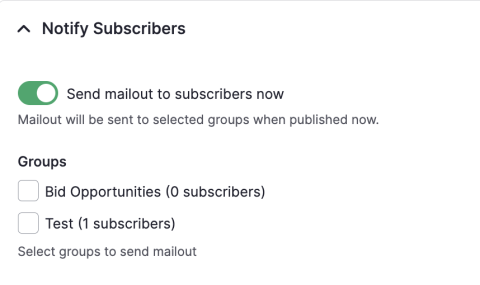
- At the bottom of the page, open the Notify Subscribers accordion
- Toggle the "Send mailout to subscribers now"
- Select the group you want to mail to
- Once done, click the Publish or Needs Review button at the top of the page
Example of the Notify Subscribers Accordion
Image